To ensure that your integration adheres to FCRA regulations and best practices, Checkr requires our partners to comply with a quick integration review. We will ask you to answer a few security questions and demonstrate your integration to one of our Partner Managers. You will be able to use your application in staging before receiving a production account. Live/production activity requires approval.
Download the Partner Certification Requirements PDF for a quick checklist of implementation components and functionality required for production approval. To assist in meeting certification requirements, Checkr also provides a Postman collection that partners can use during development. Download the Postman collection guide here.
- Use the standard integration acceptance criteria as a guide to prepare for the demo. Make sure you can demonstrate the full checklist prior to scheduling your demo session.
- Email us at partners@checkr.com to schedule an integration review once your development is complete and ready for production use.
- We’ll ask you to demonstrate your completed integration through screenshare (using a Google Hangout) by walking us through Checkr account creation and connection, Package selection, background check ordering, and review of results. We will also review your Checkr integration as a whole to ensure proper functionality and to answer any questions that you may have. A review typically takes less than 30 minutes.
That's it! We’ll approve your integration (or make suggestions) when the review is complete.
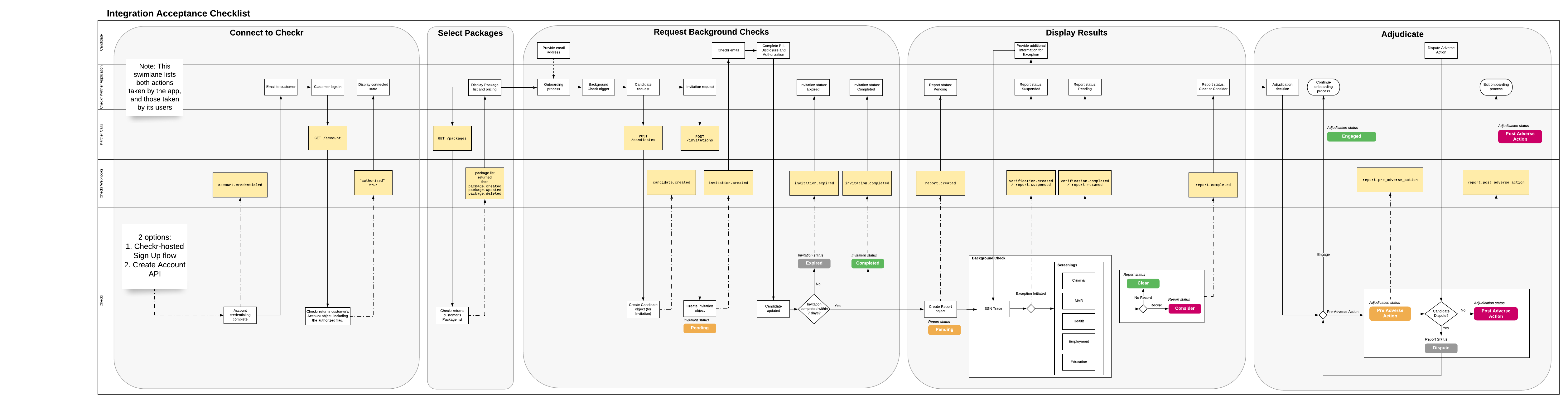
This is the checklist you will be evaluated against to be approved for production use.
Acceptance criteria for standard integrations
After an app has been developed, but before it may be deployed to product, Checkr requires both a security and a compliance review for certification:
Security Review: Demonstrate the security of your application, specifically in regard to ensuring that candidate PII is handled properly, and that the risk of a data breach is minimized.
- Integrity: Do you store sensitive candidate PII (such as SSN or driver license) in your application? If so, which fields?
- Confidentiality: Do your logs contain sensitive candidate PII or client credentials? Attach an example log for the following two API calls:
- POST https://api.checkr.com/oauth/tokens
- POST https://api.checkr.com/v1/candidates
- Authentication:
- Describe how a user authenticates to access your application. If you do not establish user identity, describe what actions are available to anonymous users.
- Describe the methods used to encrypt internal storage of secrets (keys, tokens).
Compliance Review: Most integrations require recertification at regular intervals, or after updates to the partner application. Work with your Checkr Partner Manager to determine when recertification will be required for your application.